 Alfred
In one morning Alfred gets to know your business.
You don't have to set anything up alone. We do installation, connections and import together, then we stay by your side until Alfred works the way you want. Here is the path, step by step.
The demo
We show you Alfred on a sample business similar to yours and talk about how you work: channels, clients, archive, what wastes most of your time.
Installation and connections
We install Alfred on your Mac and connect email, calendar, WhatsApp Business and your folders.
Clients and archive
We import contacts and projects from Excel, CSV or your records, and decide together how to organise the archive: by client, by area, with your codes, on your computer and in the cloud.
Rules and autonomy
We tell Alfred how you work: hours, tone, signature, things never to do. And together we choose whether and what it can do alone.
Support
We follow you while you use it every day: we adjust the rules, fix the details, answer your questions.
As soon as it's connected, Alfred gets to work
The first round starts straight away: it reads, links every message to the right client and fills the «Today» screen. These are the numbers from the first round on the sample business we use in demos.
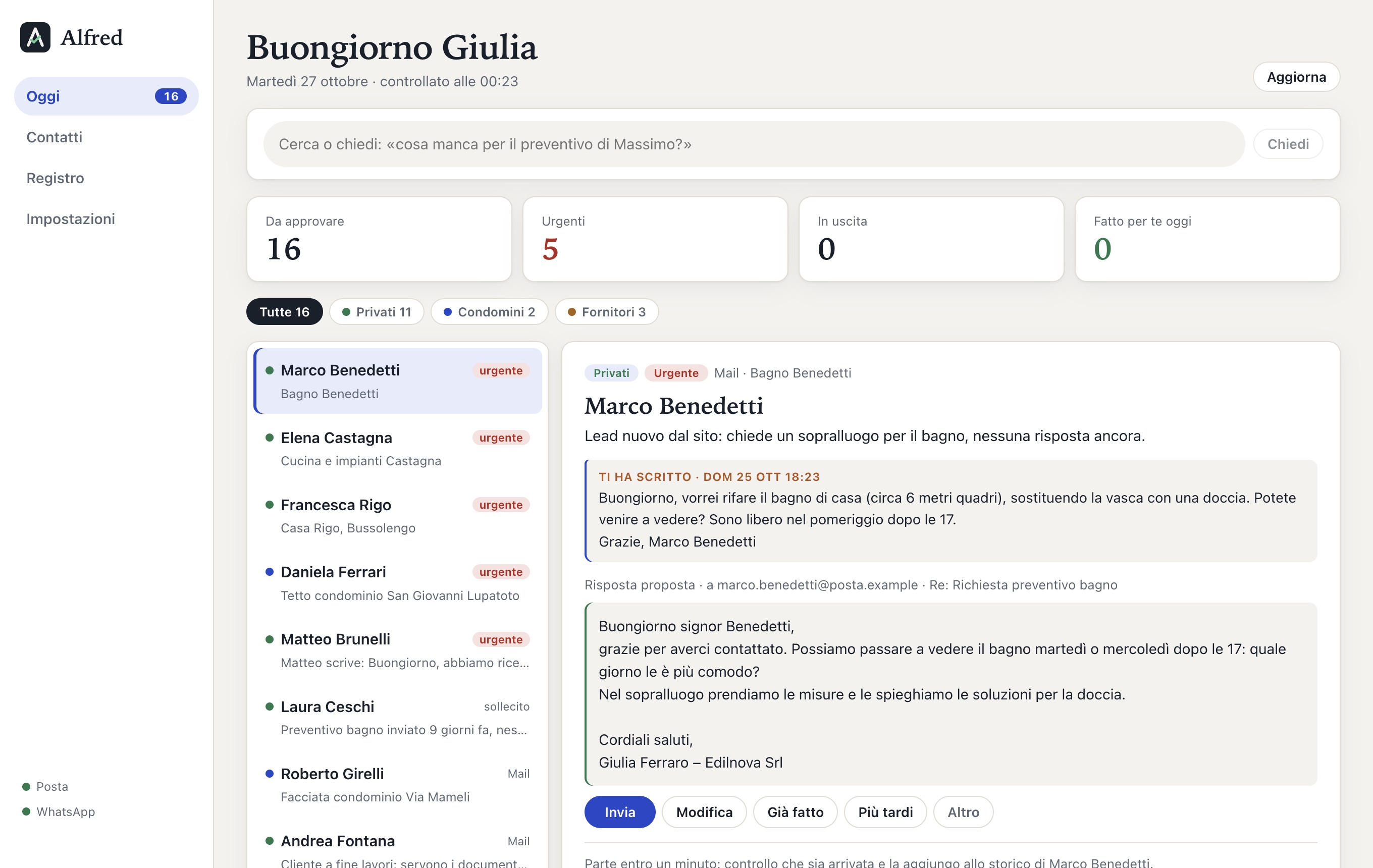
The «Today» screen after the first round. Data from an invented business.
What you need
Nothing new to buy: Alfred uses the tools you already have.
A Mac
The Windows version is in the works.
Gmail or Google Workspace
For email and calendar.
WhatsApp Business
On your business number, which you keep using from your phone.
Your folders
Even messy ones: we sort them out together.
Special terms for the first businesses
A one-off fee for installation, import and support, then a monthly fee per business, with updates and support included. From the first businesses that start with us we ask for weekly feedback, in exchange for reserved terms.
- Installation and import done by us
- Two weeks of support
- Updates and support included
- Export or delete all your data whenever you want
Questions before starting
How much time do I need to give it?
The demo takes 20 minutes, the installation one morning. In the two weeks after, a few minutes a day are enough to tell us what to fix.
Do I have to change my number or the way I use WhatsApp?
No. You keep your WhatsApp Business number and keep using it from your phone. Alfred reads the messages and prepares the replies; they go out only when you decide.
And if I stop?
Diaries, documents and archive are ordinary folders and files on your computer: they stay yours. With one button you export everything else, or delete it.
Does Alfred send messages without me knowing?
No. At first it only suggests. If you want, you switch on one by one the routine tasks it can do alone, and each one stays written in the log.
Book your demo
Write us a couple of lines: what you do, how many you are, how to reach you and when suits you. We reply within one working day.